

VaultMirror – Robust Evidence Sync for the DFIR Professional
In the world of Digital Forensics and Incident Response, data integrity and availability are everything. Whether you are syncing evidence from a field kit to a server, or mirroring your toolset across multiple workstations, we’ve all dealt with the same headaches:
The “Split-Brain” Problem: Deleting a file on one side only to have it reappear 5 minutes later because the sync tool thought it was “new” on the other side.
Process Collisions: A massive 2TB E01 image is still copying when the next scheduled sync triggers, causing disk thrashing or file-lock errors.
Environment Friction: Needing to install Python or specific libraries on a pristine forensic workstation just to run a simple mirror script.
To solve these issues, I’m excited to release VaultMirror.
What is VaultMirror?
VaultMirror is a standalone Windows utility designed to handle folder synchronization with a focus on reliability and “set-and-forget” automation. It leverages the native Windows Task Scheduler but adds a layer of intelligence specifically for forensic workflows.
Key Forensic Features:
State-Based Deletion Tracking: Unlike basic “copy-if-newer” scripts, VaultMirror maintains a local state manifest. If you delete a file in your source folder, the tool recognizes it as a deliberate action and propagates that deletion to the destination, rather than re-copying the old file.
Singleton Process Locking: If a sync operation (like a large evidence transfer) outlasts its scheduled interval, VaultMirror detects the existing process and skips the next run to prevent resource contention.
Zero-Dependency Deployment: The compiled release is a standalone
.exe. It acts as its own interpreter for background tasks, meaning you can deploy it on a vanilla Windows system without installing Python or third-party libraries.Automated Exclusions: By default, the engine ignores
.tmpfiles created during archiving or compression, reducing unnecessary I/O and log noise.
How to Use It
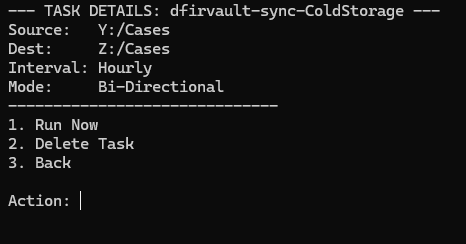
The interface is a clean, administrator-level console menu. Simply:
Launch
VaultMirror.exeas Admin.Use the GUI folder picker to select your Source and Destination.
Set your interval (Minute, Hourly, Daily, Weekly).
VaultMirror handles the rest in the background.
Managing Your Tasks
You can view active tasks, manually trigger a sync, or delete a job (which automatically cleans up the associated Windows Task and state history) directly from the management menu.
Get the Tool
VaultMirror is open-source and available now on the DFIRVault GitHub. You can download the pre-compiled v0.1-Alpha release today.
🔗 GitHub Repository: https://github.com/dfirvault/VaultMirror
As always, when dealing with evidence, test your sync pairs in a controlled environment before deploying to live case data. If you run into bugs or have feature requests, feel free to open an issue on the repo!