

DFIR Copilot: LLM-Powered Investigations Directly Inside Splunk
As DFIR professionals, we spend a huge amount of time staring at Splunk searches—trying to turn thousands (or millions) of events into a coherent story about what an attacker actually did. We write long SPL queries, pivot between dashboards, correlate disparate data sources, and constantly ask ourselves: “Does this look suspicious?” or “What am I missing here?”
Wouldn’t it be powerful if you could simply highlight a set of interesting events and ask an assistant:
- “Is this consistent with ransomware execution?”
- “What is the most likely initial access vector based on these events?”
- “Summarize the activity timeline and highlight anomalies”
- “Compare these logons to known compromised accounts in the environment”
…all without ever leaving Splunk, and without sending sensitive telemetry to a cloud provider.
That’s exactly why I built DFIRCopilot.
Why Bring Local LLMs Into Splunk Investigations?
We already have excellent detection content, dashboards, and risk-based alerting inside Splunk (many of which live in the DFIR Dashboards collection). But once we move from detection → investigation, the work becomes much more open-ended and analyst-driven.
Large Language Models excel at exactly this kind of work:
- Natural language reasoning over semi-structured data
- Summarization of long event sequences
- Pattern recognition across heterogeneous logs
- Hypothesis generation and gap identification
The problem? Most LLM integrations require sending data to external APIs (OpenAI, Anthropic, etc.), which is frequently not acceptable in DFIR and threat hunting workflows due to confidentiality, data residency, or simply organizational policy.
DFIRCopilot solves this by running everything locally and offline using Ollama.
What DFIRCopilot Does
DFIRCopilot is a Splunk app that embeds a local LLM (via Ollama) directly into your search workflow. You keep full control of your data — nothing leaves your environment.
Key capabilities:
- llmhandler command — run natural language questions directly against the results of any Splunk search
- Uses strong open-weight models such as Mistral, Llama 3, or similar (whatever you have running in Ollama)
- Works completely offline after initial model download
- Designed to assist (not replace) the analyst — it suggests hypotheses, summarizes findings, identifies anomalies, proposes next pivots
- Keeps you inside the Splunk interface — no context switching to external chat UIs
Typical investigation use-cases I’ve already found valuable:
- Asking for high-level summaries after running a broad hunting query
- Getting help interpreting unusual PowerShell or WMI patterns
- Asking “what might this be trying to achieve?” on a cluster of suspicious events
- Generating plain-English timelines from noisy authentication or process execution data
How It Works (High-Level)
- You run a normal Splunk search — e.g. a timeline of process creation events, failed logons, network connections, etc.
- Pipe the results into the llmhandler command with your question in natural language.
- The app sends the (formatted) events + your prompt to your local Ollama instance.
- Ollama runs inference using the model you selected.
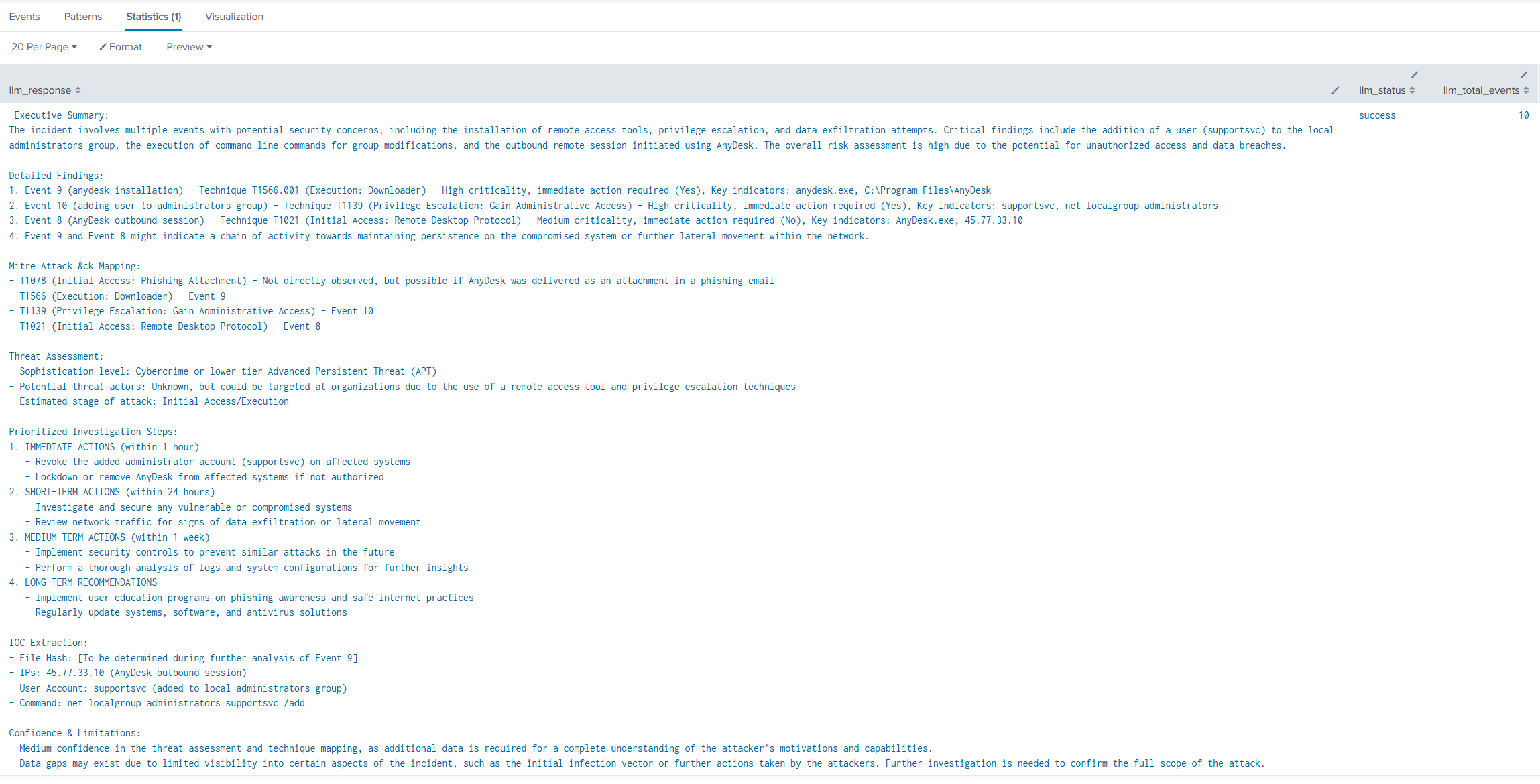
- The response streams back into Splunk as search results — usually a clean markdown-formatted answer you can read immediately.
No cloud dependency. No data exfiltration risk.
Getting Started
Prerequisites:
- A running Ollama instance (local machine or dedicated server reachable from your Splunk server/search head)
- One or more models pulled via Ollama (recommend starting with mistral:7b or llama3:8b — good balance of speed and reasoning)
- Splunk 9.x (tested on 9.1–9.2)
Installation steps:
- Download the latest release from the GitHub repository: https://github.com/dfirvault/DFIRCopilot
- Install it as a normal Splunk app (via Settings → Manage Apps → Install app from file, or extract to $SPLUNK_HOME/etc/apps)
- Configure the add-on:
- Go to the DFIRCopilot app → Configuration
- Set the Ollama endpoint (default: http://localhost:11434)
- Choose your default model
- Optional: adjust temperature, max tokens, system prompt if you want a more DFIR-tuned personality
- Restart Splunk (or just the app if you prefer)
That’s it — you’re ready to start asking questions.
Quick Usage Example
index=windows sourcetype="WinEventLog:Security" EventCode=4688
| table _time host Process_Name Parent_Process_Name CommandLine User
| head 50
| llmhandler "Summarize this process execution activity. Highlight anything that looks like potential defense evasion, credential access, or lateral movement."
Or a more targeted question:
index=edr process_name=*powershell*
| llmhandler "Is this PowerShell behavior consistent with known malicious patterns (C2, discovery, privilege escalation)? Explain your reasoning."
Current Limitations & Roadmap Thoughts
This is an early release — expect rough edges:
- Token limits can truncate very large result sets (mitigate by reducing fields or using | head)
- Inference speed depends heavily on your hardware (GPU acceleration makes a big difference)
- Prompt engineering is still manual — future versions could include DFIR-specific system prompts and chain-of-thought helpers
- No built-in RAG over your entire environment yet (coming in future updates)
I’m actively using it in real investigations and plan to keep improving it based on what actually helps during live cases.
Final Thoughts
DFIRCopilot isn’t here to replace analysts — it’s built to make us faster and sharper when we’re already deep in the weeds of a hunt or response.
Having a reasoning partner that understands logs, speaks natural language, and never phones home feels like a meaningful step forward for privacy-sensitive DFIR work.
Give it a try, break it, and let me know what works (and what doesn’t). Issues, feature requests, and pull requests are very welcome over on GitHub: